> ## Documentation Index
> Fetch the complete documentation index at: https://help.kajabi.com/llms.txt
> Use this file to discover all available pages before exploring further.
# Pause a customer's subscription or payment plan
> Pause billing indefinitely or for a set period of time, with automatic resumption on a date you choose.
Pausing temporarily stops billing on a customer's subscription or payment plan. It is useful when a customer is not available to be billed for a while, for example while they are traveling, between seasons of your program, or working through a hardship, and you would rather hold their spot than cancel and ask them to purchase again.
You can pause indefinitely and resume manually, or set a date and let Kajabi resume billing automatically.
**Note:** Pausing from Kajabi is available for subscriptions and payment plans processed through Kajabi Payments or Stripe. If your customer paid through PayPal, you will not see the pause option. [Pause a PayPal subscription manually](#pause-a-paypal-subscription-manually) instead.
## Two ways to pause
| Pause type | What happens | When to use it |
| :--------------- | :-------------------------------------------------------------- | :------------------------------------------------------------------------- |
| **Indefinite** | Billing stops until you resume it yourself. | You do not know yet when the customer will be ready to start paying again. |
| **Set duration** | Billing stops and resumes automatically on the date you choose. | You and the customer have agreed on a return date. |
A set duration pause saves you from tracking the return date yourself and remembering to resume. You can tell the two apart at a glance: a paused subscription or plan shows a **Resuming on** badge with the date when it is a set duration pause. A pause with no resume date shown is indefinite.
Pausing for a set period of time is rolling out gradually and may not be available on your account yet. Pausing indefinitely is available to everyone. If you open the pause window and see a single confirmation instead of the two options above, the set duration option has not reached your account yet. If you run into anything unexpected, reach out to [payments.support@kajabi.com](mailto:payments.support@kajabi.com).
## Pause a subscription or payment plan
You can start a pause from any of these places:
* The subscription detail page
* The payment plan detail page
* **Sales** > **Subscriptions**
* **Sales** > **Payment Plans**
### Pause from a customer's profile
1. Open **Contacts** from your Dashboard
2. Select your customer, then **Open full profile**
3. Open the **Purchases** tab
4. Select the subscription or payment plan you want to pause
5. Open the **More Actions** menu (…)
6. Select **Pause Payments**
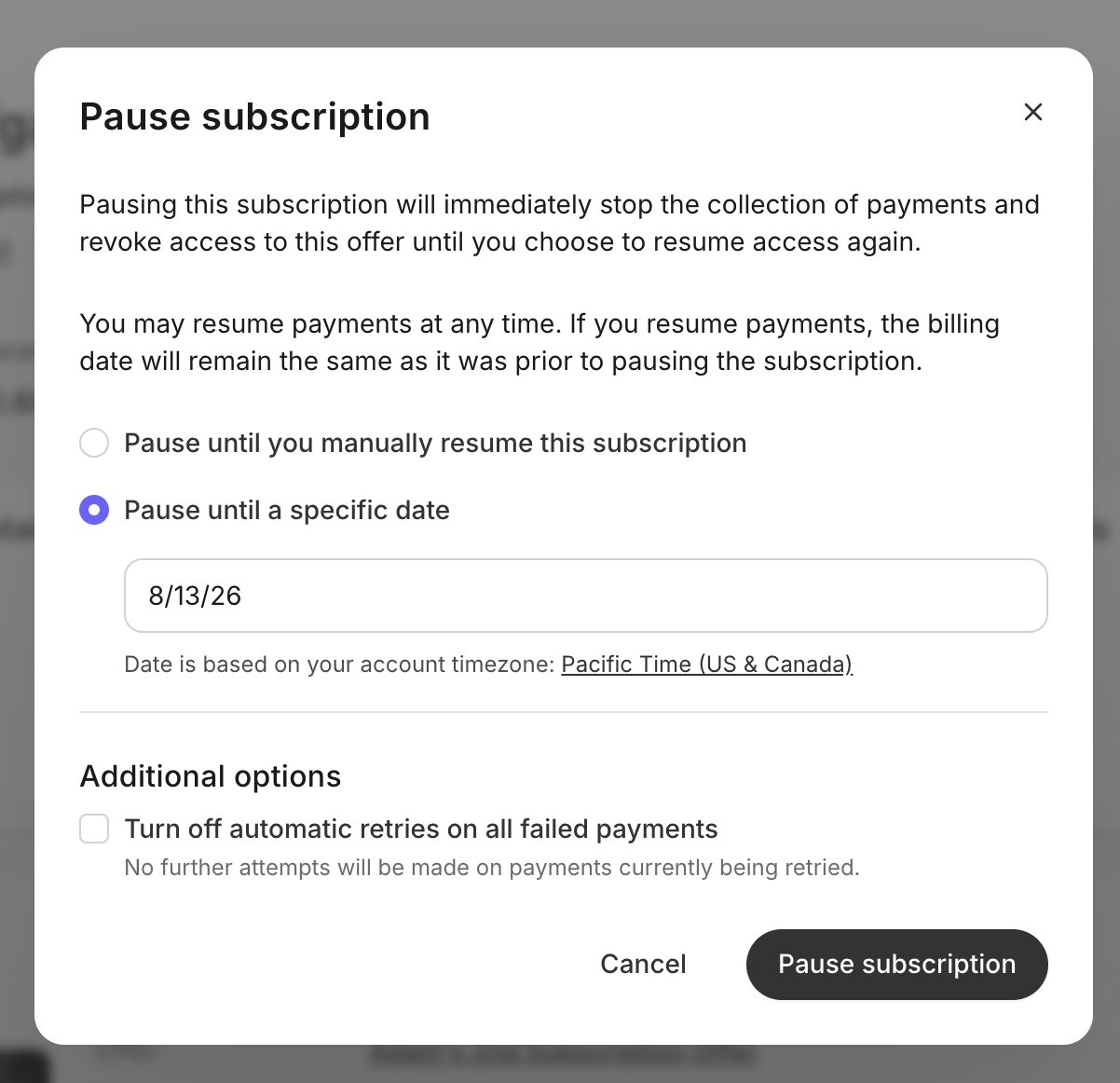
7. Choose **Pause until you manually resume this subscription** or **Pause until a specific date**
8. If you chose a set period, pick the resume date in the calendar
9. For payment plans, leave **Revoke access** checked to remove product access during the pause, or uncheck it to let the customer keep access while billing is stopped
10. Confirm to apply the pause
 ## What happens during a pause
* **Payments that come due are voided.** Kajabi does not attempt to charge the customer while the pause is active.
* **Voided payments do not count toward a payment plan's total.** If a customer has a six payment plan and one payment falls inside the pause, they still owe six payments. Only paid installments count, so the plan finishes later rather than for less.
* **The billing date does not shift.** The billing anchor stays where it was, so billing picks up on the customer's normal schedule when the pause ends.
* **There are no catch-up charges.** Nothing is collected retroactively for the paused period. Billing simply resumes.
* **Product access follows the Revoke access setting** you chose when you paused.
**Note:** If there is a past due invoice at the time you pause, pausing does not stop that payment from being retried. Pausing only stops future payments that would come due after the pause begins.
**Tip:** If a customer wants to skip a single charge and keep their schedule otherwise, [updating the billing date](/articles/sales/kajabi-payments/how-to-update-the-billing-date-for-kajabi-payments-subscriptions-and-payment-plans) moves the next charge without voiding it. Pausing voids the payments inside the pause window. Pick based on whether you want to collect that payment later or not at all.
## Resume or change a pause
A paused subscription or payment plan gives you two options: resume it now, or change when it resumes.
### Resume now
1. Open the paused subscription or payment plan
2. Open the **More Actions** menu (…)
3. Click **Resume Payments**
4. Confirm to resume
Billing restarts on the customer's normal schedule. This works for both indefinite and set duration pauses, so you can always end a pause early.
## What happens during a pause
* **Payments that come due are voided.** Kajabi does not attempt to charge the customer while the pause is active.
* **Voided payments do not count toward a payment plan's total.** If a customer has a six payment plan and one payment falls inside the pause, they still owe six payments. Only paid installments count, so the plan finishes later rather than for less.
* **The billing date does not shift.** The billing anchor stays where it was, so billing picks up on the customer's normal schedule when the pause ends.
* **There are no catch-up charges.** Nothing is collected retroactively for the paused period. Billing simply resumes.
* **Product access follows the Revoke access setting** you chose when you paused.
**Note:** If there is a past due invoice at the time you pause, pausing does not stop that payment from being retried. Pausing only stops future payments that would come due after the pause begins.
**Tip:** If a customer wants to skip a single charge and keep their schedule otherwise, [updating the billing date](/articles/sales/kajabi-payments/how-to-update-the-billing-date-for-kajabi-payments-subscriptions-and-payment-plans) moves the next charge without voiding it. Pausing voids the payments inside the pause window. Pick based on whether you want to collect that payment later or not at all.
## Resume or change a pause
A paused subscription or payment plan gives you two options: resume it now, or change when it resumes.
### Resume now
1. Open the paused subscription or payment plan
2. Open the **More Actions** menu (…)
3. Click **Resume Payments**
4. Confirm to resume
Billing restarts on the customer's normal schedule. This works for both indefinite and set duration pauses, so you can always end a pause early.
 ### Change the pause duration
If a customer needs more or less time, you do not have to resume and pause again.
1. Open the paused subscription or payment plan
2. Open the **More Actions** menu (…)
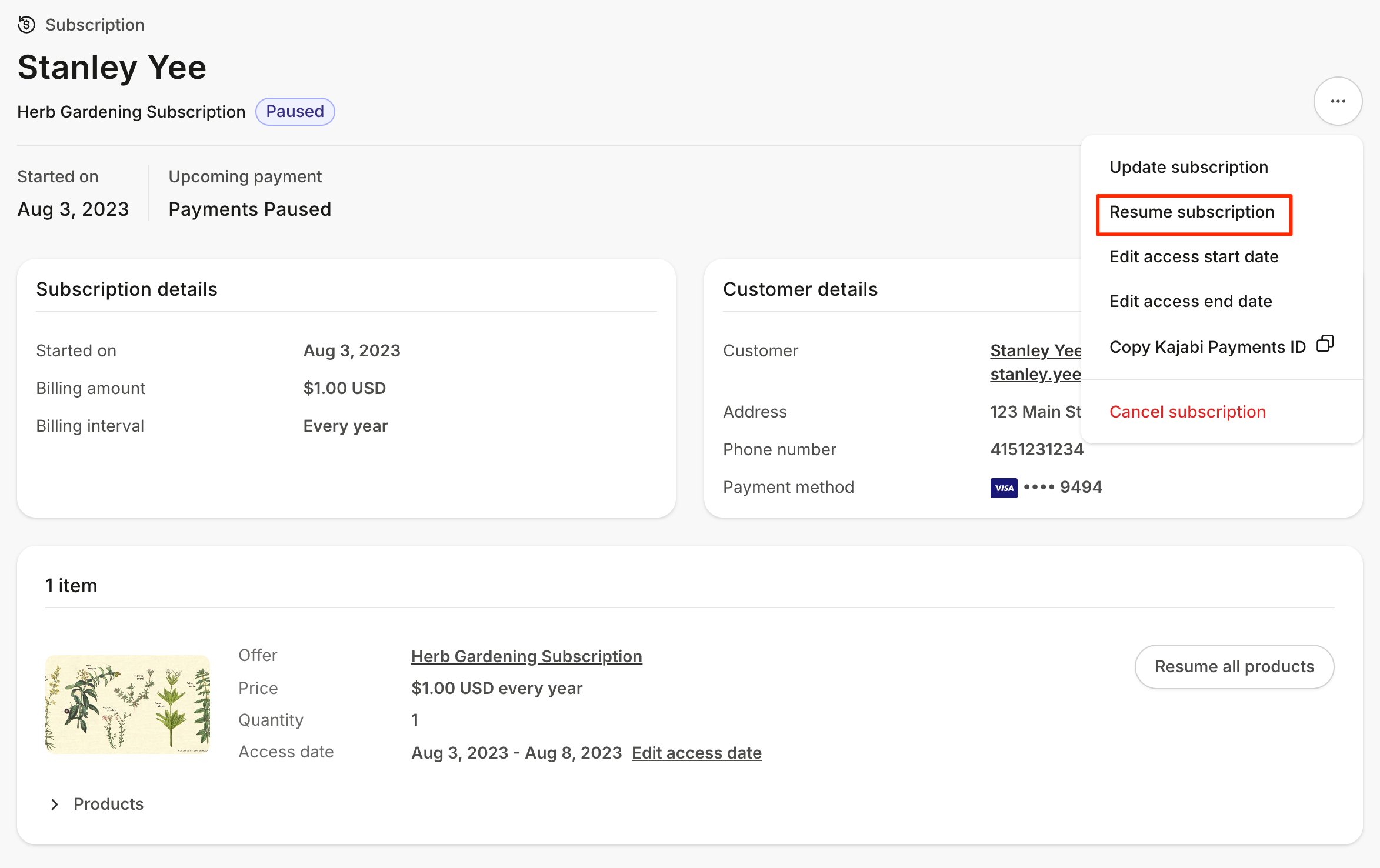
3. Click **Resume Payments**
4. In the modal, click **Modify Pause Duration**
5. Adjust the resume date, or switch between indefinite and a set duration
6. Confirm to save
The modal opens with the current pause settings already selected, so you only need to change what is different.
### Change the pause duration
If a customer needs more or less time, you do not have to resume and pause again.
1. Open the paused subscription or payment plan
2. Open the **More Actions** menu (…)
3. Click **Resume Payments**
4. In the modal, click **Modify Pause Duration**
5. Adjust the resume date, or switch between indefinite and a set duration
6. Confirm to save
The modal opens with the current pause settings already selected, so you only need to change what is different.
 ## Notifications
When a subscription or payment plan is paused, the email address on your account receives a notification confirming the pause. For a set duration pause, that email includes the resume date and whether product access was revoked.
Your customer receives the **User Paused Subscription** email when the pause begins and the **User Resumed Subscription** email when billing restarts. For a set duration pause, these show the resume date. You can customize both templates in your [automated email notification settings](/articles/account-settings/notifications/edit-automated-email-notifications).
**Note:** Kajabi does not send your customer a reminder before an automatic resume. If you want them warned ahead of the first charge, plan to reach out yourself.
## Where paused subscriptions and plans appear
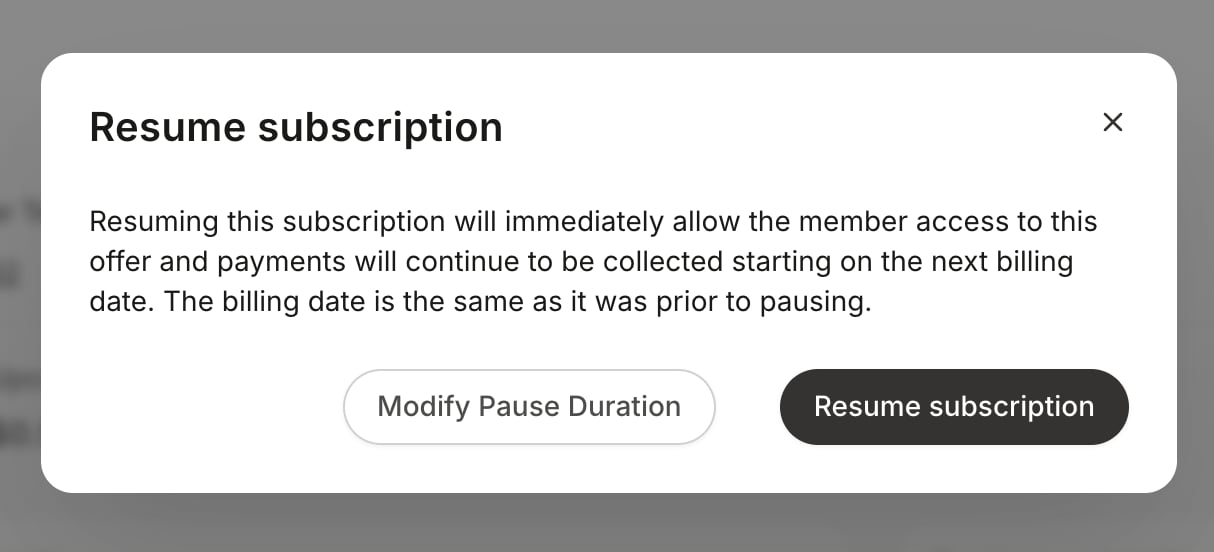
On the subscription or payment plan detail page, a set duration pause shows a badge with the resume date, and the upcoming payment date accounts for the pause. An indefinite pause shows the standard paused status with no resume date.
## Notifications
When a subscription or payment plan is paused, the email address on your account receives a notification confirming the pause. For a set duration pause, that email includes the resume date and whether product access was revoked.
Your customer receives the **User Paused Subscription** email when the pause begins and the **User Resumed Subscription** email when billing restarts. For a set duration pause, these show the resume date. You can customize both templates in your [automated email notification settings](/articles/account-settings/notifications/edit-automated-email-notifications).
**Note:** Kajabi does not send your customer a reminder before an automatic resume. If you want them warned ahead of the first charge, plan to reach out yourself.
## Where paused subscriptions and plans appear
On the subscription or payment plan detail page, a set duration pause shows a badge with the resume date, and the upcoming payment date accounts for the pause. An indefinite pause shows the standard paused status with no resume date.
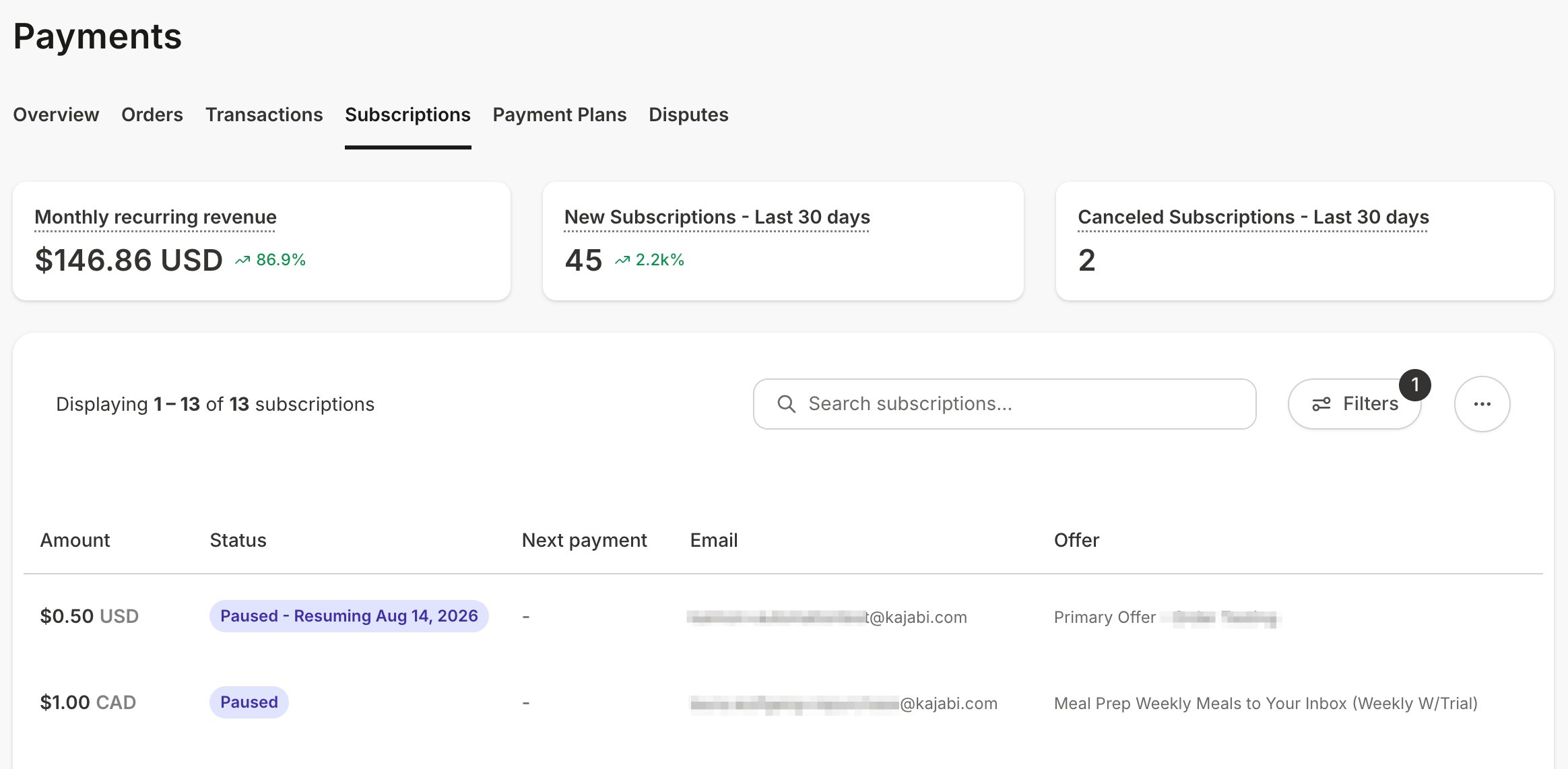 Paused subscriptions and plans also appear with a Paused status in your **Sales** > **Subscriptions** and **Sales** > **Payment Plans** tables, and in the [Subscription status by offer](/articles/analytics/report-subscription-status-by-offer) and [Payment plan status by offer](/articles/analytics/report-payment-plan-status-by-offer) reports.
## Pause a PayPal subscription manually
PayPal subscriptions cannot be paused from Kajabi. Suspend the subscription in PayPal, then revoke product access in Kajabi if you want to remove access during the pause.
### Suspend the subscription in PayPal
1. Log into your PayPal Business or Premier account
2. Click **Activity** in the top menu
3. Open the **All transactions** dropdown menu
4. Select **Subscription payments**
5. Locate the subscription and click the subscription name
6. Click **Suspend**
7. Confirm and click **Suspend Profile**
[Suspend and reactivate a subscription in PayPal](https://developer.paypal.com/docs/paypal-payments-standard/integration-guide/manage-subscriptions/#) has PayPal's full instructions.
### Revoke product access in Kajabi
Skip this if you want the customer to keep access while billing is suspended.
1. Open **Contacts** from your Dashboard
2. Select your customer, then **Open full profile**
3. Open the **Purchases** tab
4. Select the offer, then click **Revoke all products**
5. Confirm by clicking **Yes, revoke access**
### Reactivate a PayPal subscription
1. Log into your PayPal Business or Premier account
2. Click **Activity** in the top menu
3. Open the **All transactions** dropdown menu
4. Select **Subscription payments**
5. Locate the subscription and click the subscription name
6. Click **Reactivate**
7. Confirm and click **Reactivate Profile**
Then return to the customer's profile in Kajabi and click **Resume all products** to restore product access.
**Tip:** [Use Tags](/articles/contacts/manage-your-contacts/tags-overview) to keep track of customers you have paused in PayPal, so you can find them again when it is time to reactivate.
## Frequently asked questions
### Does pausing cancel the subscription?
No. The subscription or payment plan stays in place and billing restarts when the pause ends. Pausing is the alternative to cancelling for a customer you expect to keep.
### Will my customer owe less on a paused payment plan?
No. Payments voided during a pause do not count toward the plan, so the customer still owes the full number of payments. The plan finishes later than originally scheduled.
### Can I pause a subscription processed through PayPal?
Not from Kajabi. [Suspend it in PayPal](#pause-a-paypal-subscription-manually) instead.
### What happens if I need to extend a pause?
Use **Modify Pause Duration** to move the resume date. You do not need to resume and pause again.
## Related articles
* [Cancel a customer's subscription](/articles/contacts/manage-your-contacts/how-to-cancel-your-customers-subscription)
* [Revoke product access from a customer](/articles/contacts/manage-your-contacts/revoke-product-access-from-a-customer)
* [Update billing dates for Kajabi Payments subscriptions](/articles/sales/kajabi-payments/how-to-update-the-billing-date-for-kajabi-payments-subscriptions-and-payment-plans)
* [The difference between revoking an offer and payment cancelations](/articles/contacts/manage-your-contacts/what-is-the-difference-between-revoking-an-offer-and-payment-cancelations)
Paused subscriptions and plans also appear with a Paused status in your **Sales** > **Subscriptions** and **Sales** > **Payment Plans** tables, and in the [Subscription status by offer](/articles/analytics/report-subscription-status-by-offer) and [Payment plan status by offer](/articles/analytics/report-payment-plan-status-by-offer) reports.
## Pause a PayPal subscription manually
PayPal subscriptions cannot be paused from Kajabi. Suspend the subscription in PayPal, then revoke product access in Kajabi if you want to remove access during the pause.
### Suspend the subscription in PayPal
1. Log into your PayPal Business or Premier account
2. Click **Activity** in the top menu
3. Open the **All transactions** dropdown menu
4. Select **Subscription payments**
5. Locate the subscription and click the subscription name
6. Click **Suspend**
7. Confirm and click **Suspend Profile**
[Suspend and reactivate a subscription in PayPal](https://developer.paypal.com/docs/paypal-payments-standard/integration-guide/manage-subscriptions/#) has PayPal's full instructions.
### Revoke product access in Kajabi
Skip this if you want the customer to keep access while billing is suspended.
1. Open **Contacts** from your Dashboard
2. Select your customer, then **Open full profile**
3. Open the **Purchases** tab
4. Select the offer, then click **Revoke all products**
5. Confirm by clicking **Yes, revoke access**
### Reactivate a PayPal subscription
1. Log into your PayPal Business or Premier account
2. Click **Activity** in the top menu
3. Open the **All transactions** dropdown menu
4. Select **Subscription payments**
5. Locate the subscription and click the subscription name
6. Click **Reactivate**
7. Confirm and click **Reactivate Profile**
Then return to the customer's profile in Kajabi and click **Resume all products** to restore product access.
**Tip:** [Use Tags](/articles/contacts/manage-your-contacts/tags-overview) to keep track of customers you have paused in PayPal, so you can find them again when it is time to reactivate.
## Frequently asked questions
### Does pausing cancel the subscription?
No. The subscription or payment plan stays in place and billing restarts when the pause ends. Pausing is the alternative to cancelling for a customer you expect to keep.
### Will my customer owe less on a paused payment plan?
No. Payments voided during a pause do not count toward the plan, so the customer still owes the full number of payments. The plan finishes later than originally scheduled.
### Can I pause a subscription processed through PayPal?
Not from Kajabi. [Suspend it in PayPal](#pause-a-paypal-subscription-manually) instead.
### What happens if I need to extend a pause?
Use **Modify Pause Duration** to move the resume date. You do not need to resume and pause again.
## Related articles
* [Cancel a customer's subscription](/articles/contacts/manage-your-contacts/how-to-cancel-your-customers-subscription)
* [Revoke product access from a customer](/articles/contacts/manage-your-contacts/revoke-product-access-from-a-customer)
* [Update billing dates for Kajabi Payments subscriptions](/articles/sales/kajabi-payments/how-to-update-the-billing-date-for-kajabi-payments-subscriptions-and-payment-plans)
* [The difference between revoking an offer and payment cancelations](/articles/contacts/manage-your-contacts/what-is-the-difference-between-revoking-an-offer-and-payment-cancelations)